
Bank statements always updated, without manual effort
Receive statements via real-time API or automatic overnight EDI. Import OFX files and export in CSV, XLSX, ODS, QIF, or OFX for your accounting.
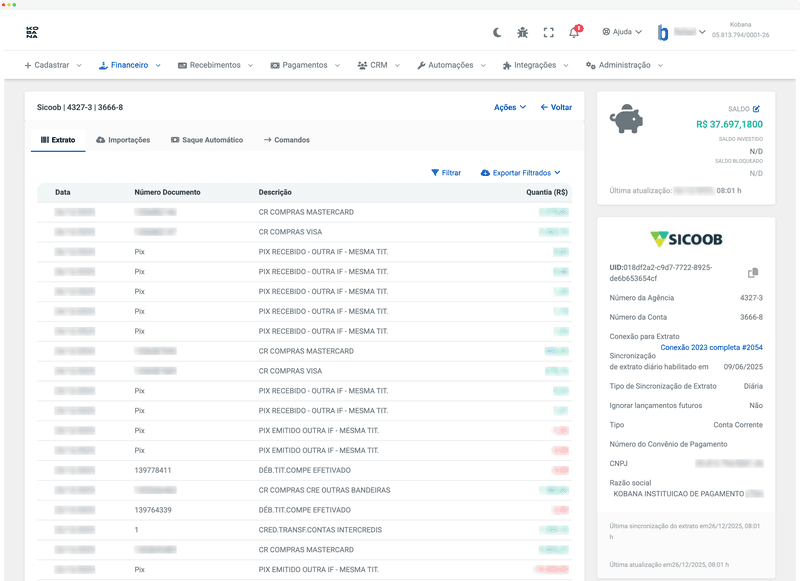
Multiple ways to receive and export statements
From bank to your screen in seconds
Configure the bank connection
Connect your account via bank API or EDI. In EDI mode, files arrive automatically overnight and are processed by Kobana before business hours.
Receive statements automatically
Via API, data arrives in real time. Via EDI, files are sent by banks in the early hours and processed automatically. You can also import OFX files manually.
View transactions
Access the consolidated statement with filters by date, type (credit/debit), amount, and description. Each transaction includes date, amount, description, and automatic category.
Export in the format you need
Download the statement in CSV, XLSX, ODS, QIF, or OFX. Each format serves a need: spreadsheets, accounting systems, ERPs, or financial software.
Benefits for Treasury
Use cases
Export statements from all accounts in OFX format and import directly into the accounting system. Reduce close time from days to hours.
- Batch export
- Standard OFX format
- Accurate data
Receive transactions automatically every day and compare with accounts payable and receivable entries. Identify discrepancies quickly.
- Daily update
- Automatic comparison
- Discrepancy alerts
Access complete transaction history with payer/recipient data. Respond to audit requests with agility.
- Complete history
- Detailed data
- Traceability
Filter transactions by category and period. Identify spending patterns and savings opportunities.
- Advanced filters
- Categorization
- Financial insights
Integrated with major banks
 Banco do Brasil
 Bradesco
 Itaú
Itaú Santander
 Caixa
Caixa Sicoob
 Sicredi
 Banrisul
 Inter
Inter BTG
BTG Safra
Safra BV
BV ABC Brasil
 Ailos
Ailos Arbi
Arbi Banese
 Banestes
 BNB
BNB BNP Paribas
 BRB
BRB BS2
BS2 Cora
Cora Credisis
 Cresol
 Daycoval
 Mercantil
 Rendimento
 Sofisa
 Unicred
 Uniprime
 Banco IndustrialBanco do BrasilBradescoItaúSantanderCaixaSicoobSicrediBanrisulInterBTGSafraBVABC BrasilAilosArbiBaneseBanestesBNBBNP ParibasBRBBS2CoraCredisisCresolDaycovalMercantilRendimentoSofisaUnicredUniprimeBanco Industrial
Frequently asked questions
Automate your statement imports
Via API, EDI, or OFX file import. Export in 5 different formats for your accounting.