
Explore the Banking Gateway from the inside
Explore the platform's main features and discover how the Banking Gateway can transform your company's financial management.
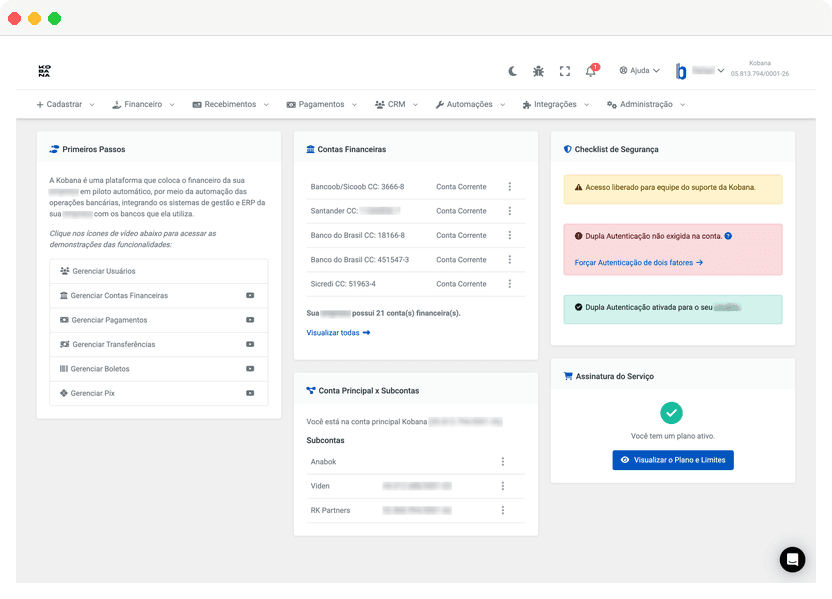
Main Dashboard
Your financial command center
The Banking Gateway dashboard offers a consolidated view of all your financial operations. In one place, you track balances, recent transactions and important indicators.
View the available balance across all your connected bank accounts. Automatic or on-demand updates.
Track the latest movements: paid boletos, received PIX, completed transfers.
Stay informed about important events: boletos due soon, confirmed payments, processing errors.
Shortcuts to your most frequent operations: issue boleto, make a transfer, check statement.
Account Management
All your accounts in one place
Register and manage multiple bank accounts, billing wallets and PIX accounts in a centralized way.
Add accounts from different banks in a few clicks. Configure details like branch, account number and operation type.
Configure wallets specifically for issuing boletos. Define parameters like instructions, fines and interest.
Register PIX keys for receiving payments. Support for random keys, CPF/CNPJ, email and phone.
Define who has access to each account and what operations they can perform.
Collections and Boletos
Issue boletos with automatic registration
The Banking Gateway automates the entire boleto issuance process: from bank registration to payment tracking.
Generate one boleto at a time or import a spreadsheet with hundreds of titles. Bank registration is automatic.
Add PIX QR Code to the boleto so the payer can choose their payment method. Automatic reconciliation in both cases.
Configure automatic email and SMS sends: reminders before due date, boleto availability notice, overdue collection.
View the status of each boleto: registered, paid, overdue, cancelled. Receive payment notifications via webhook.
PIX
Receive and send with instant PIX
Use PIX for fast collections or to make payments and transfers in seconds.
Generate a fixed QR Code to receive variable amounts. Ideal for point-of-sale and donations.
Create charges with defined amount and due date. Full control over each transaction with automatic reconciliation via txid.
Every boleto can include a PIX QR Code. If the payer uses PIX, the Banking Gateway identifies it and settles the boleto automatically.
Send payments by entering the recipient's PIX key or paste the code from a PIX QR Code.
Payments
Pay bills directly from the platform
Centralize supplier payments, taxes and utility bills. Schedule, approve and track everything in one place.
Pay supplier boletos and utility bills like water, electricity and phone by entering the barcode.
Pay federal taxes, government fees and state/municipal taxes directly.
Schedule payments for future dates. The Banking Gateway processes them automatically on the day.
For greater control, configure approval flows. Process multiple payments at once.
Transfers
Transfer funds securely
Make transfers to any bank using PIX or TED. Define beneficiaries, schedule sends and track each operation.
Instant transfer, 24 hours a day, 7 days a week. Immediate arrival in the recipient's account.
Traditional bank-to-bank transfer. Processed on business days, usually same day.
Group multiple transfers for joint processing and approval.
Register frequent recipients to speed up future operations.
Statements and Reconciliation
View movements and reconcile automatically
Access statements from all your accounts and let the Banking Gateway automatically identify which payments correspond to which charges.
View movements from multiple accounts on a single screen. Filter by period, operation type or amount.
For banks with API integration, statements are updated automatically. For others, import OFX or CNAB files.
The Banking Gateway cross-references received payment data with issued boletos, automatically identifying settlements and partial payments.
Export statements in CSV, PDF or OFX to import into your management or accounting system.
Banking Connections
Connect your banks securely
The Banking Gateway offers different integration methods to meet the particularities of each bank and need.
Real-time connection to the bank through official APIs. Offers greater speed and full feature set.
Traditional integration via remittance and return files. Compatible with any bank.
Combine API for some operations and files for others, getting the best of each method.
Configure API credentials, digital certificates and access keys securely.
Keep exploring
Now that you know the platform, how about scheduling a personalized demonstration or exploring our technical documentation?
Schedule a conversation with our team and get all your questions answered.
Schedule a chatDevelopers can explore our API and integration examples.
View documentationReady to simplify your financial management?
Schedule a chat and discover how the Banking Gateway can help your company.